
In This Article:
A stock scan can narrow a large market down to a list of charts worth reviewing. It cannot tell you whether a stock has a clean setup or whether a trade fits your plan. I use this TC2000 swing trading scan as a first pass to find liquid stocks with enough daily range to interest me, then I inspect the charts myself.
Below are the filters I use, the TC2000 PCF formulas behind them, and a few ways to adjust the scan when it returns too many or too few stocks. These are my preferences, so treat the thresholds as starting points rather than rules every trader should follow.
My TC2000 swing trading scan filters
This is a long-biased starting scan. It looks for stocks above key moving averages, with minimum price, volume, average daily range, and dollar volume thresholds.
| Filter | PCF formula | What it does |
|---|---|---|
| Price above $2 | C > 2 | Removes stocks below my preferred minimum price. |
| Current daily volume above 1 million shares | V > 1000000 | Checks the volume on the current bar. Use an average-volume condition if that is what you intend to filter. |
| 20-day ADR above 6% | 100 * (AVG((H / L), 20) - 1) > 6 | Filters for stocks with a larger average daily high-to-low range. |
| Dollar volume above $100 million | C * V > 100000000 | Uses closing price multiplied by volume to screen for dollar volume. |
| Price above the 50- and 200-day SMAs | C > AVGC50 AND C > AVGC200 | Keeps stocks whose current price is above both moving averages. |
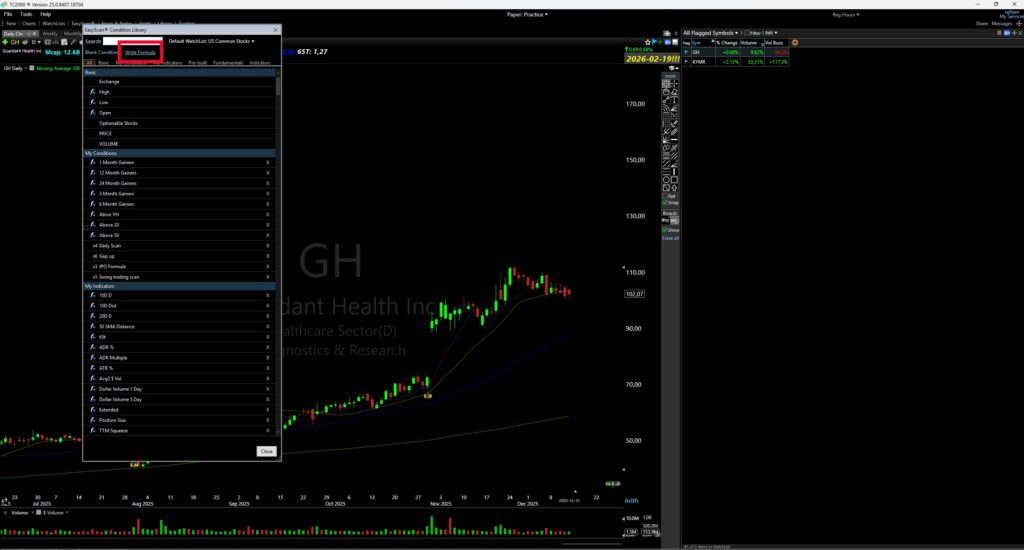
In TC2000, PCF formulas can be added from the Condition Editor by choosing Write Formula. The exact menus can change as TC2000 updates its interface, so the screenshots below may look different from your version.
How to create a TC2000 EasyScan
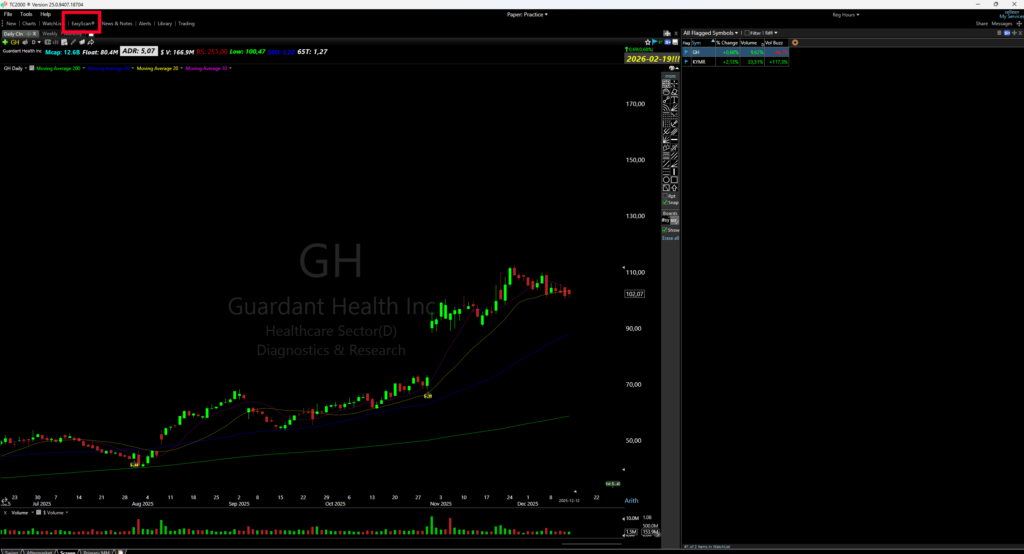
1. Open EasyScan
Open TC2000 and go to EasyScan or the condition library. Start a new scan or condition set using the stock universe you want to search.
2. Add a formula condition
Create a new condition and choose Write Formula to enter a PCF. Depending on the current layout, you may also be able to add conditions from the Condition Editor or from a watchlist.
3. Enter and save the scan conditions
Name the scan, then add each formula as a separate condition. Save the conditions so you can reuse or adjust them later. If TC2000 flags a formula, check the timeframe and syntax in the PCF editor before adding the next one.
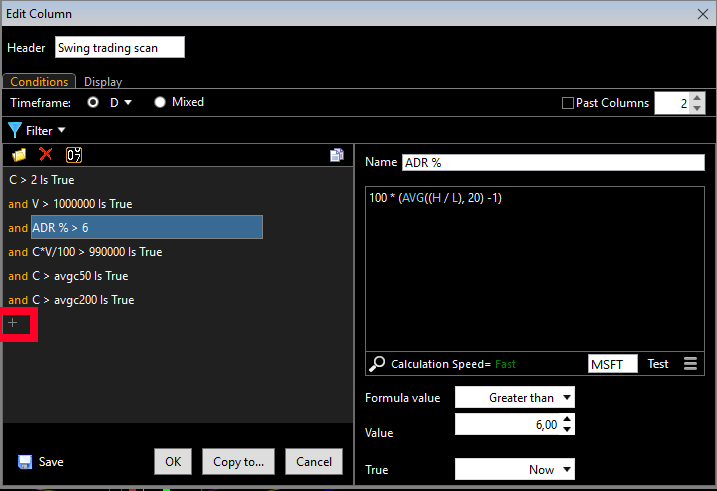
The PCF formulas in my TC2000 stock screener
Price above $2
I start with a minimum price because I generally prefer to focus on stocks priced above $2. I’ve found that this fits my own trading better. You can raise the threshold to $5 or $10 if that suits your approach, but it will reduce the number of results.
C > 2This condition checks that the current price is above $2. It does not tell you whether the stock is a good trade or whether its chart is in a suitable setup.
Volume above 1 million shares
The formula below checks volume on the current bar. On a daily chart, that means the current day’s volume. Since volume can change during the session, I usually review this scan after the close or keep in mind that an intraday result may not reflect the final daily volume.
V > 1000000If you want to screen for average volume over the last 20 bars instead, use AVGV20 > 1000000. That answers a different question: whether average volume across that period exceeds one million shares. I prefer to be clear about which volume measure a scan uses rather than treating current volume and average volume as interchangeable.
Average daily range above 6%
ADR, or average daily range, measures the typical high-to-low range over a chosen period. My formula uses 20 bars and filters for an ADR above 6%:
100 * (AVG((H / L), 20) - 1) > 6I like stocks with a larger daily range because they have room to move. But ADR measures range, not direction or momentum, and a high ADR does not mean a stock will move in the direction I want. Larger ranges can also mean more volatility and wider risk. I still check the chart and decide whether the potential setup makes sense for me.
For more detail on the formula, see my guide to ADR and ATR PCF formulas for TC2000.
Dollar volume above $100 million
Share volume alone can be misleading when comparing stocks at very different prices. Dollar volume is price multiplied by the number of shares traded, so it gives another way to compare how much trading value passed through a stock. I use a $100 million threshold in this scan.
C * V > 100000000TC2000’s help documentation describes current-bar dollar volume as C * V. My separate dollar volume PCF guide also shows the scaled format C * V / 100 > 1000000 for the same $100 million threshold. Use the version that matches how you have set up and checked your TC2000 condition.
I use dollar volume as one liquidity screen, not proof that institutions are buying or that a stock will trade smoothly. Liquidity can change, and the spread and price action still matter when I review a candidate.
Price above the 50- and 200-day moving averages
This condition keeps stocks trading above both the 50-day and 200-day simple moving averages:
C > AVGC50 AND C > AVGC200It is a trend filter, not confirmation that the stock is in a clean uptrend. The averages may be flat or turning down, and a stock can be extended or forming a poor pattern while remaining above them. I open the chart and assess the trend and setup before deciding whether it belongs on my watchlist.
This version of the scan is for potential long candidates because it requires price above both averages. If you trade short setups, build a separate scan with criteria that match your short strategy instead of assuming this list also identifies short candidates.
Optional: review revenue growth
As an additional step, I like to review companies with strong annual revenue growth. I look for around 30% growth when it fits the type of stock I’m researching. TC2000 may not have the fundamental filter I want for this, so I sometimes check the figures manually in a platform such as MarketSurge.
Revenue growth is only one piece of company research. It does not guarantee institutional buying, future price appreciation, or a successful trade.
Review and adjust the TC2000 scan results
After adding the conditions, save the scan and open the filtered watchlist. The number of stocks you see will change with market conditions and the thresholds you choose. I had 37 stocks in the example below; there is no fixed result count that makes a scan correct.
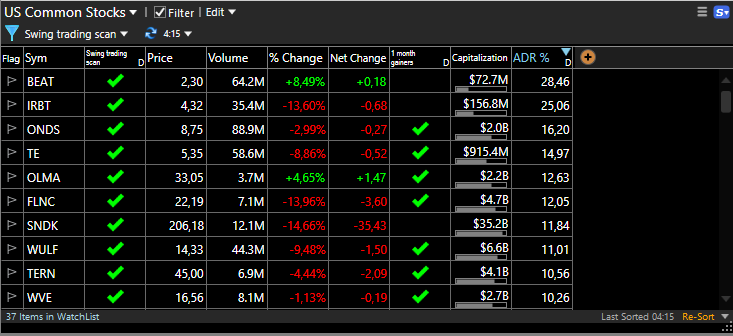
If the list is too long, tighten one filter at a time—for example, raise the minimum price or dollar volume. If the list is empty, loosen a threshold or check that each formula uses the timeframe you intended. Changing one condition at a time makes it easier to see how the scan behaves.
Then review the charts. I look for a setup I actually trade, check the broader market context, and consider the stock’s liquidity and risk. A stock matching these filters is a candidate for review, not an automatic entry.
You can also compare this platform-specific scan with my guides to swing trading scans and my swing trading rules.
Frequently asked questions
What is a TC2000 swing trading scan?
It is a set of EasyScan conditions used to filter stocks against criteria you choose. My scan uses price, volume, ADR, dollar volume, and moving averages to create a list for chart review.
Is this TC2000 stock screener a buy signal?
No. The scan finds stocks that match the filters. You still need to review each chart and decide whether it has a setup that fits your strategy and risk plan.
Why does my scan return a different number of stocks?
Results depend on the stock universe, timeframe, current market conditions, and the thresholds in each condition. Your count may also differ if you use average volume instead of current-bar volume or change the dollar-volume formula.
Final thoughts
This TC2000 swing trading scan reflects the filters I use to narrow my search: minimum price and liquidity, a larger daily range, and price above the 50- and 200-day moving averages. I treat the output as a starting watchlist, then look at each chart for a setup I recognize and a risk level I’m comfortable with.
Adjust the thresholds to fit your own approach, and keep track of how your changes affect the names the scan returns. For more ideas, see my guides to swing trading scans and ADR in TC2000, or follow me on X (@sellentrading).