
In This Article:
When I started scanning, I sometimes treated the results as if they were trade ideas by themselves. I now separate the process into two steps: first build a list of stocks that fit my basic criteria, then study the charts to see whether any have a setup I actually trade.
This is the beginner-friendly routine I use to find stocks for swing trading. It starts with stocks that have already been strong over different time periods, then narrows the list using liquidity and volatility filters.
How to scan stocks for swing trading
My starting point is to run three separate stock scans:
- 1-month gainers
- 3-month gainers
- 6-month gainers
These lists show stocks that have performed well over different periods. I use them to find candidates for a watchlist, not to predict that a stock will keep rising. A stock can be a past gainer and still be extended, breaking down, or forming a chart pattern I do not trade.
After running the scans, I apply a few basic filters to remove stocks that do not fit my preferences.
| Filter | My starting range | Why I use it |
|---|---|---|
| Share price | Above $3–$5 | Sets a minimum price for the stocks I review. |
| Average daily range | Above 5%–6% | Looks for stocks with a larger average daily high-to-low range. |
| Average share volume | Above 500,000–1 million shares | Filters for stocks with more average trading activity. |
| Average dollar volume | Above $50 million–$100 million | Compares the dollar value traded, which accounts for different share prices. |
These are my preferences, not universal rules. You may need to adjust them for your account, strategy, or the stocks you trade. Not every platform offers the exact same filters, so use the closest available option and check what it measures.
1. Start with 1-, 3-, and 6-month gainers
I like to look at gainers over three different periods instead of relying on just one list. The 1-month list shows more recent performance, while the 3- and 6-month lists give me a wider view of which stocks have been strong over a longer stretch.
I often focus on the top 50 stocks from each list. I also pay attention to names that appear in more than one scan. That overlap tells me the stock has performed well across multiple lookback periods, which is a reason to inspect it further, not proof that it is a good trade.
You can run these scans in a stock screener such as Finviz, TC2000, or TradingView. The filter names and available lookback periods vary by platform. I’ve written separate walkthroughs for Finviz, TC2000, and TradingView.
2. Filter for price and trading activity
Share price above $3–$5
I usually set my minimum price around $3 to $5. You can choose a higher or lower level based on what you trade, but remember that a low share price by itself does not make a stock cheap or a good opportunity.
Average volume above 500,000–1 million shares
I prefer stocks that average at least 500,000 to 1 million shares per day. Average share volume gives me a quick sense of how many shares have traded over the screener’s lookback period.
Share volume does not tell the whole story. The stock’s price matters too, which is why I also look at dollar volume. A high average share-volume figure does not guarantee a tight spread or a particular fill, so I still check the stock’s current trading conditions before considering a trade.
Dollar volume above $50 million–$100 million
Dollar volume is share price multiplied by the number of shares traded. For example, 100,000 shares traded at $10 represents $1 million in dollar volume. The same number of shares traded at $100 represents $10 million.
I generally look for at least $50 million to $100 million in daily dollar volume, depending on the scan and the stocks I’m reviewing. This is a screening preference, not proof that institutions are buying or that a stock will be easy to trade. Check the spread and trading activity on the individual stock as well.
For one way to calculate dollar volume in TC2000, see my guide to the dollar volume PCF formula.
3. Look for enough daily range
I usually look for an average daily range of at least 5% to 6%. A larger range means the stock has had wider daily high-to-low moves over the period being measured. It does not tell me which direction the stock will move next.
Be aware that platforms may label this filter differently. ADR is usually based on average daily high-to-low ranges. ATR includes gaps from the previous close and is often shown as a price amount rather than a percentage. When comparing stocks at different prices, make sure the filter is expressed as a percentage if that is what you intend to compare.
Higher-range stocks can move more, but they can also be more volatile. I check whether the chart structure gives me a logical place to manage risk instead of assuming a high ADR makes a stock a better trade.
My guide to ADR and ATR formulas in TC2000 explains the difference in more detail.
4. Compare the lists and build a watchlist
Once the filters are applied, I compare the 1-, 3-, and 6-month results. I pay special attention to stocks that appear near the top of more than one list, then add the names worth reviewing to a watchlist.
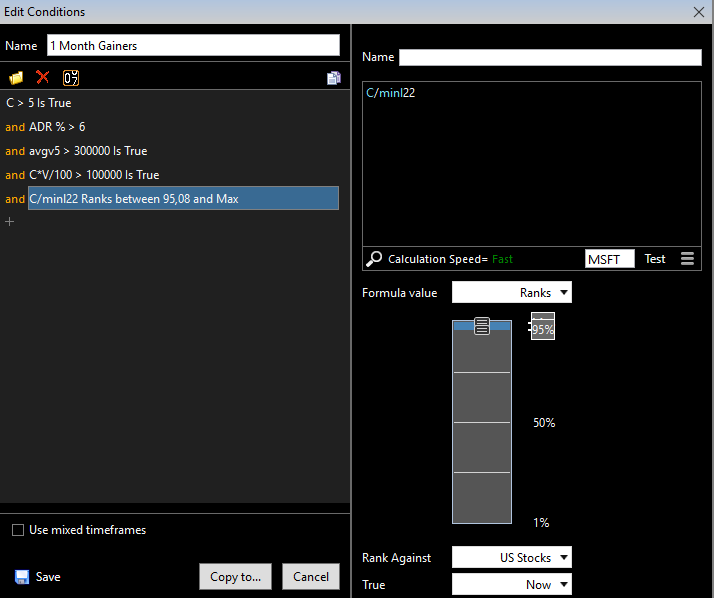
The exact number of results will change with the market and your settings. You do not need to force the scan to return a specific number of stocks. If there are too many names, tighten one filter at a time. If the list is too small, loosen a filter and see how the results change.
5. Review the chart before considering a trade
A stock appearing on a gainer list does not mean it has a setup I want to trade. I open the chart and check the trend, recent price action, and whether the stock is forming one of the setups in my plan.
I also check the broader market and the stock’s earnings date. An upcoming earnings report can create a large overnight move, so it is important to know when the company is scheduled to report before holding a position through that event.
For examples of the patterns I look for, see my guide to swing trading setups and strategies.
Optional filters for your swing trading stock scan
Exclude biotech stocks if you do not trade them
Biotech stocks can move sharply on clinical-trial, regulatory, or other company-specific news. If you are not comfortable researching those events or managing that type of volatility, you can exclude biotech stocks from your scan. This will also remove potential candidates, so it is a preference rather than a rule for every trader.
Review revenue growth and earnings
I sometimes look for companies with strong year-over-year revenue growth, around 40% or more, and positive or improving earnings per share. These are additional research criteria I like to review. They do not guarantee future price performance, and different platforms may report growth over different periods.
If you add fundamental filters, check the period and definition used by the platform. Quarterly year-over-year revenue growth is different from annual revenue growth, and estimates may differ from reported results.
Common beginner mistakes when scanning for swing trades
- Treating a scan result as a buy signal. A scan only shows that a stock met the selected criteria. Review the chart and your trading plan.
- Adding too many filters at once. Start with a few conditions and add more only when you understand how they change the results.
- Confusing volatility with momentum. A large average range shows movement, not the direction of the next move.
- Using share volume as the only liquidity check. Price, dollar volume, spread, and your order size matter too.
- Assuming past gainers will keep rising. The scan finds past performance. The chart still needs to show a setup you are prepared to trade.
Frequently asked questions
What is a good swing trading scan for beginners?
A simple starting point is to scan 1-, 3-, and 6-month gainers, then filter by minimum price, average volume, dollar volume, and average daily range. These settings narrow the list, but you still need to review charts for setups that match your plan.
How many stocks should a swing trading scan return?
There is no ideal number for every trader. The result count will depend on market conditions, the stock universe, and your filters. Aim for a list you can review carefully rather than adjusting settings to reach an arbitrary number.
Should I use ADR or ATR when scanning stocks?
Both measure range, but they handle gaps differently. ADR typically measures average high-to-low range, while ATR includes gaps from the previous close. Check whether your platform displays the measure as a percentage or a dollar amount.
Final thoughts
My swing trading scan routine starts with 1-, 3-, and 6-month gainers, then filters for price, average volume, dollar volume, and daily range. I compare the lists and review the charts for a setup I trade. The scan helps me organize the search, but the chart review and my own trading rules determine whether I consider a stock.
To see how I set up the process on different platforms, read my guides to Finviz, TC2000, and TradingView.